Looking for a UiPress, WP Adminify or Admin Menu Editor alternative? An honest map for 2026
You install an admin plugin once and forget about it, until something moves. In 2026, three things moved. WordPress 7.0 gave the admin a new look in May. In July, the uiXpress team announced an "Admin Framework" that replaces wp-admin. And as of 19 October, the Admin Menu Editor site says sales of its Pro version are suspended. If you are reading this, you may be packing your bags.
Refined Admin Dashboard, which this article also covers, is ours. It redraws the whole WordPress admin, every screen, in dark or light, from a menu sorted into themed sections to plugin notices gathered in one counter. Every fact in this article comes from the plugin's WordPress.org page or its maker's site, and for our own plugin, from its code. All of it was checked on 19 October 2026, and each section opens with what the tool you are leaving does better. (Yes, we are marking our own homework. We are trying to mark it hard.)
Before you switch: what your tool was doing
Admin plugins fall into three families. Some replace the WordPress screens with their own application, like uiXpress. Others style the WordPress screens, like WP Adminify or Refined Admin Dashboard, and the plugins that use the standard screens follow along. The rest fix one part only: the menu for Admin Menu Editor, a box of small modules for Admin and Site Enhancements (ASE).
The easiest replacement often belongs to the same family. Switching families works fine, but you also change the way you work. The full map, with the other tools, is in our overview from 15 October.
Leaving UiPress or uiXpress
What it does better: building your own admin. uiXpress, the paid version from the UiPress team, comes with a menu builder, login page customisation, a white label that goes as far as renaming plugins, and a dark mode that also covers other plugins' screens. Its "Admin Framework", an opt-in beta since 8 July in uiXpress 1.3.0, goes further: a separate admin, at its own address, where you describe new screens. It costs $97 once for one site. The free version, UiPress Lite, is still on WordPress.org: 6,000+ installations, last release on 19 August, and WordPress.org notes that it hasn't been tested with the last three major releases.
The replacements:
- WP Adminify, to stay with a complete toolkit: several skins, menu entries hidden by role, custom admin pages.
- Refined Admin Dashboard, to keep WordPress's own screens and have them redrawn. Other plugins keep their screens, with the same look, and builders that bring their own interface are detected and left alone.
What you lose with Refined Admin Dashboard: custom admin pages, the separate application and the renaming of plugins.
Leaving Admin Menu Editor, or its Pro version
What it does better: the menu, in depth. The free version changes the titles, icons and addresses of entries, reorders them by drag and drop, hides them and adds custom links. Pro sets permissions role by role and can hide a menu from everyone except one person. It has 300,000+ installations and is tested up to WordPress 7.1.3. Its maker's site says Pro sales are suspended; a form lets you renew an existing licence.
The replacements:
- The menu organiser of ASE, free: reorder, rename, hide. Hiding by role takes ASE Pro, $39 a year for one site.
- WP Adminify, whose free menu editor renames, reorders and hides by role.
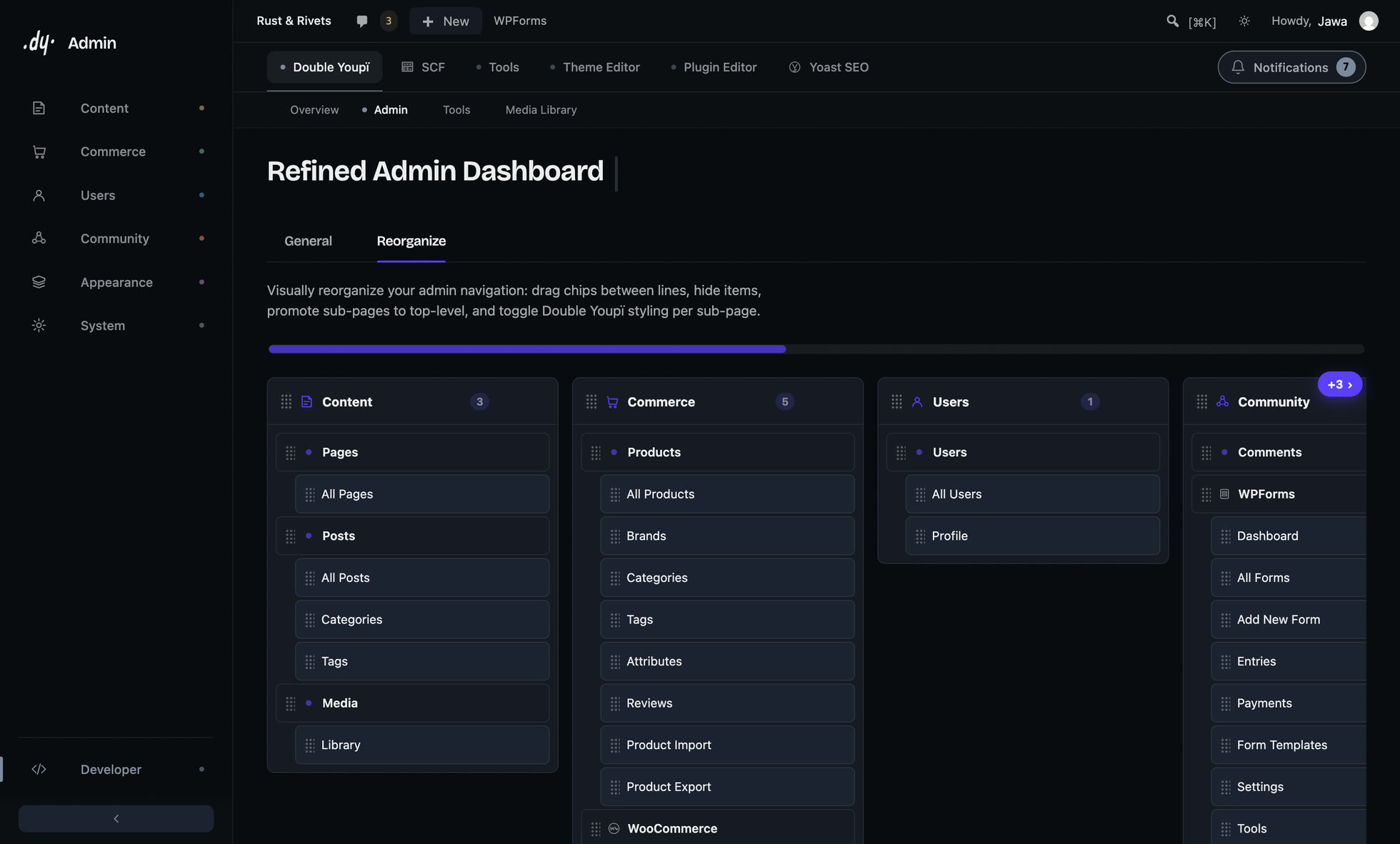
- Refined Admin Dashboard: the menu sorted into themed sections, and an editor to reorder, move, hide or promote an entry, without code. When you install a plugin, its menu line is offered to you instead of landing wherever it likes.
What you lose with Refined Admin Dashboard: one menu rules the whole site (WordPress still hides what a role isn't allowed to open). You can't rename an entry or add a custom link, though you can rename the sections of the rail, change their icons and create new ones.
Leaving WP Adminify
What it does better: choice. Light, Dark, Gradient and Glass skins, two free admin templates and seven in Pro, a dark mode, a menu editor that hides entries by role, unlimited media folders in the free version, custom admin pages. It is the broadest offer on this list: 6,000+ installations, last release on 12 October, tested up to WordPress 7.1.3. Pro costs $79 a year for one site, or $129 for life.
What Refined Admin Dashboard gives you for free and WP Adminify charges for: a login screen with your brand, which WP Adminify leaves to its Loginfy add-on. Notices get different treatment: WP Adminify hides them, Refined Admin Dashboard gathers them in a counter you open when you want.
What you lose: the choice of styles. Refined Admin Dashboard comes in two outfits, dark or light. (We made the call, as usual.) You also lose the menu by role and the custom pages.
Looking for a dark mode, and nothing else
Dark Mode for WP Dashboard does exactly that, for free: the whole admin, block editor and Site Editor included, with 44 screens reworked in its version 1.3.8 and 14 common plugins supported. It has 3,000+ installations. Darkify darkens the site and the admin together, with the Dark Reader library; there is a Pro version, and 1,000+ installations.
WordPress 7.1 still has no dark mode. The proposal that brought its design tokens plans to explore that kind of experience in future releases (source).
Refined Admin Dashboard is dark by default, with a light version, and you switch from the admin bar. Your choice applies before the page first appears, so the old admin never flashes past.
Looking for a white label
White Label CMS (200,000+ installations, free) takes care of the login page, your brand in the header and footer, the dashboard and which menus show. Branda, by WPMU DEV (20,000+), lines up more than thirty modules, from the admin bar to system emails, and can replace the word "WordPress" with your site's name. LoginPress (200,000+) does the login page alone, with far more settings than ours: logo, background, form border, error messages, footer.
Refined Admin Dashboard carries your logo and accent colour all the way to the login screen, works out the text contrast so it stays readable, and composes a dashboard for each role. For the rest of a white label, look at the first three.
What Refined Admin Dashboard doesn't do
So you can choose without a nasty surprise:
- no custom admin pages and no separate application;
- one menu for the whole site, where Admin Menu Editor Pro, ASE Pro and WP Adminify set it by role;
- fewer login settings than LoginPress;
- no renaming of plugins;
- and it is young: version 1.0 came out on 14 October 2026.
Switching without risk
Refined Admin Dashboard is reversible: deactivate it and the admin is back to what it was. A per-user mode, which you switch on in the settings, lets each account return to the stock admin without affecting the others. The media library imports your folders from FileBird, Real Media Library or HappyFiles in one click, without deleting anything. The menu settings of your old tool, however, don't carry over: plan a few minutes of tidying.
How to choose
- You want to build your own admin: uiXpress.
- You want the most complete toolkit, several styles and a menu by role: WP Adminify.
- You only ever wanted the menu: Admin Menu Editor, or the free organiser of ASE.
- A dark mode and nothing else: Dark Mode for WP Dashboard.
- A white label: White Label CMS or Branda, and LoginPress for the login page alone.
- The whole admin redrawn, your plugins included, for free: Refined Admin Dashboard. (You saw that ending coming.)
See Refined Admin Dashboard before you install it
It is free, it will stay free, and nothing is held back. Get it from WordPress.org, or watch the four-minute film first: it walks through every screen before you install anything.
The five, cell by cell
| Refined Admin Dashboard | WP Adminify | uiXpress | Admin Menu Editor | Admin and Site Enhancements | |
|---|---|---|---|---|---|
| Approach | styles the screens | styles the screens | replaces the screens | menu tool | box of modules |
| Whole admin redrawn, dark and light | ✓ | ✓ | € | ✕ | ✕ |
| Menu editor | ✓ | ✓ | € | ✓ | ✓ |
| Menu set role by role | ✕ | ✓ | ~ | € | |
| Plugin notices | gathered in a counter | hidden | gathered in a panel | ||
| Custom admin pages | ✕ | offered | € | ||
| Login screen with your brand | ✓ | € | € | ~ | |
| Folders in the media library | ✓ | ✓ | categories, in Pro | ||
| Price for one site | Free | Free · Pro $79/year or $129 lifetime | $97 once | Free · Pro: sales suspended | Free · Pro $39/year or $99 lifetime |
| Active installations | fewer than 10 | 6,000+ | 6,000+ (UiPress Lite) | 300,000+ | 200,000+ |
| Tested up to | WordPress 7.1.3 | WordPress 7.1.3 | UiPress Lite: not shown | WordPress 7.1.3 | WordPress 7.1.3 |
✓ in the free version · ~ limited in the free version · € paid · ✕ not offered
Checked on 19 October 2026 on each plugin's WordPress.org page and its maker's site. Empty cell: nothing found on their pages that day. Features and prices change.
Frequently asked questions
- What is the best UiPress alternative in 2026?
- To build a custom admin, uiXpress, from the same team, or WP Adminify, the most complete toolkit. To keep WordPress's own screens and have them redrawn in dark or light, for free, Refined Admin Dashboard.
- Is there a free alternative to WP Adminify Pro?
- Refined Admin Dashboard is free in full: the whole admin in dark or light, notices gathered in a counter, a login screen with your logo and colour, and folders in the media library. It offers no choice of skins and no menu set role by role.
- What can replace Admin Menu Editor?
- The free menu organiser of Admin and Site Enhancements reorders, renames and hides entries; hiding by role is in its Pro version. WP Adminify also hides entries by role. Refined Admin Dashboard sorts the menu into themed sections and rearranges it without code, with one menu for the whole site; you can rename those sections and create new ones.
- Can I go back after installing Refined Admin Dashboard?
- Yes. Deactivate it and the admin is back to what it was. A per-user mode, which you switch on in the settings, also lets each account return to the stock admin without affecting anyone else.
- Does Refined Admin Dashboard work with Bricks and Elementor?
- Yes. Builders that bring their own interface are detected and left alone. In Bricks 2.4, the folders and collections of the media library even show up in the builder's media browser.