Refined Admin Dashboard is out: the whole WordPress admin, redrawn, for free
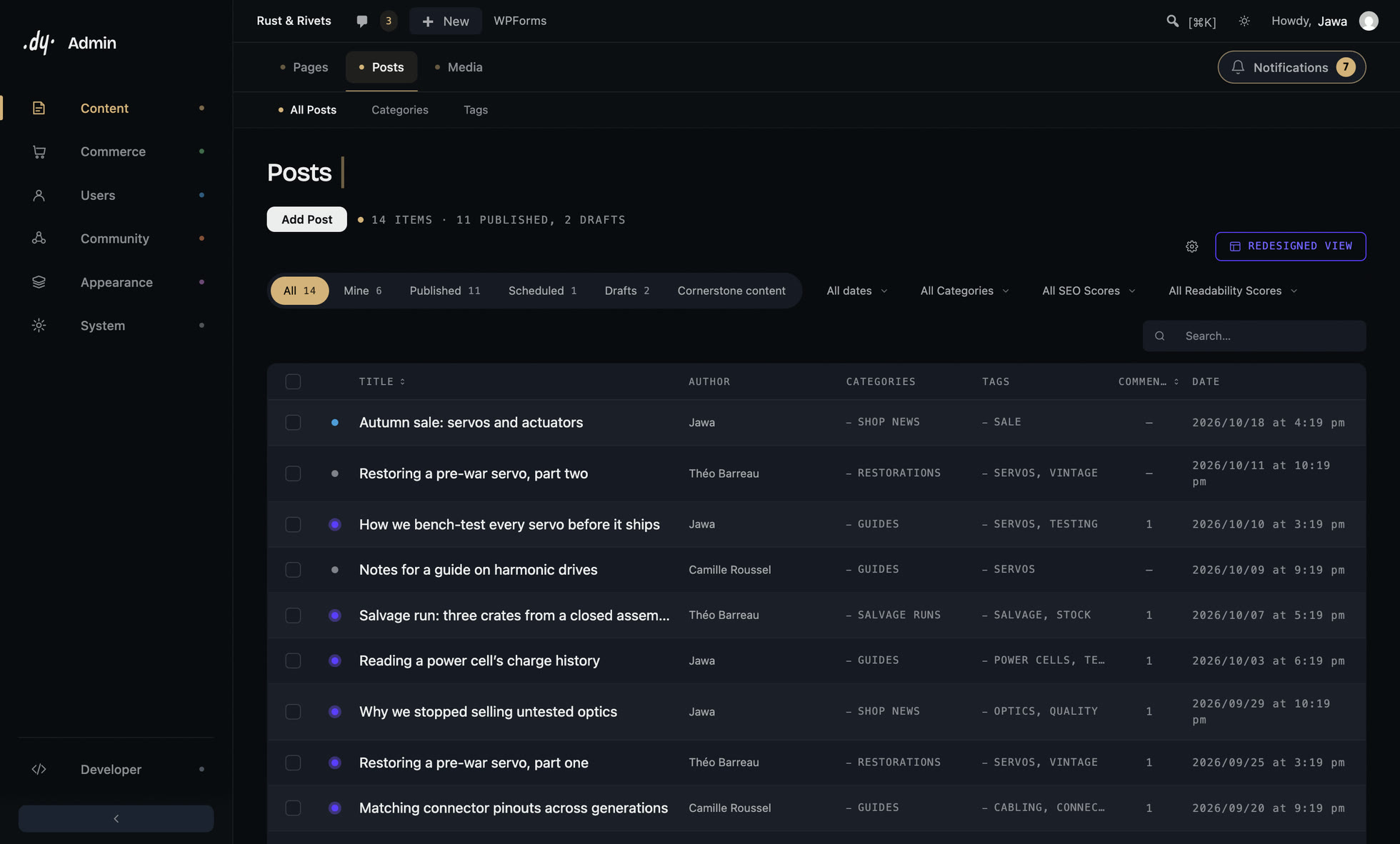
Refined Admin Dashboard has been on WordPress.org since 14 October. It redraws the whole WordPress admin, in dark or light, and it is free. If you build sites for a living, you spend your days in there. It might as well be pleasant.
The admin has looked the same since 2013: grey on grey, a sidebar that every plugin adds a line to, a dashboard full of widgets nobody reads. In June I wrote that WordPress was finally redesigning its admin, and that we meant to go further, sooner. This is it.
What changes when you activate it
Every screen, at once. Refined Admin Dashboard does not add one pretty page and leave the rest alone: it restyles the components WordPress itself uses, so the change reaches every corner of the admin.
- The admin is dark by default and light when you want it, switched from the admin bar. Your choice applies before the page appears, so the old grey interface never flashes past.
- The sidebar becomes a rail of seven sections, resizable and collapsible. A second bar shows the sub-pages and tabs of the screen you are on.
- You compose the dashboard: drag the widgets, add a heading, save the layout under a name, give each role its own.
- Notices from WordPress and your plugins go into a single counter that you open when it suits you. The confirmation after an action still shows up straight away, as a short message that fades.
- Lists show their actions on hover, beside the title: the native ones and the ones your plugins add, each shown once.
- The classic editor is redrawn, the block editor dressed to match. Your content is not touched.
- You pick an accent colour and a logo once. The text contrast against your colour is computed for you, and the login screen gets the same design.
- A menu editor lets you drag pages between sections, hide what nobody uses and promote a sub-page to the top level, without code. When you install a new plugin, its menu waits for your decision instead of landing at the bottom.
Refined Media Library is inside
Redrawing the admin and leaving the Media screen as it was would have been an odd promise. So the whole of Refined Media Library ships inside Refined Admin Dashboard: folders and collections by drag and drop, a detail panel beside the grid, where each file is used before you delete it, WebP and AVIF on upload, and a one-click import from FileBird, Real Media Library, HappyFiles and other folder plugins.
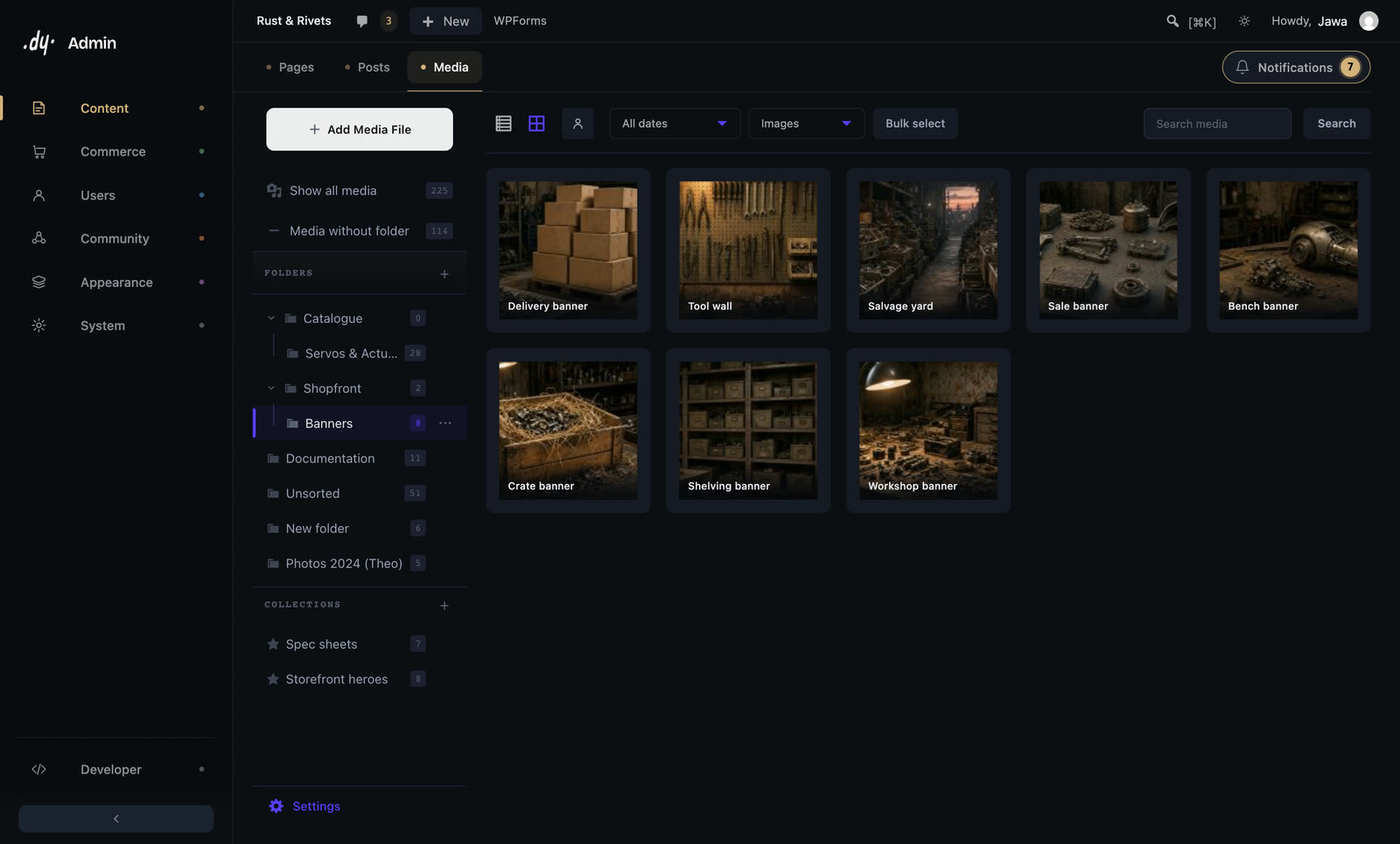
If you already run Refined Media Library, activate Refined Admin Dashboard and you are done: same folders, same collections, same settings. Refined Media Library notices that Refined Admin Dashboard is active and steps aside by itself (since its version 0.3.7), so nothing runs twice and there is nothing to deactivate by hand. Install one or the other, never both.
And if all you ever wanted was a better media library, Refined Media Library on its own is still the right choice.
Your plugins keep working
That was the rule from the first line of code. Refined Admin Dashboard styles the markup WordPress already produces; it never swaps it for its own. A plugin that uses the standard screens is redrawn along with the rest: WooCommerce orders and products, for instance, get the same lists and keep every row action. A plugin that brings its own full interface, like a page builder, is detected and left alone.
Nothing is fetched from a third party. The display font is served from your own site, and body text uses the fonts already on your computer. If someone on the team prefers the stock admin, you can let each account decide for itself.
Ten small plugins you can uninstall
Most WordPress sites carry a handful of tiny plugins that each fix one thing. Refined Admin Dashboard includes ten of them, each behind its own switch:
- duplicate a post or a page as a draft;
- upload SVG files, cleaned of anything executable;
- move the login page to an address of your choice;
- force HTTPS;
- local avatars, without a single request to Gravatar;
- the classic editor instead of the block editor;
- comments switched off everywhere;
- no more email for every successful automatic update;
- no more "Is this admin email correct?" screen every few months;
- Cmd+S (or Ctrl+S) to save any admin form.
If the dedicated plugin for one of these is already active, the built-in tool steps aside instead of doing the job twice.
Free, with nothing held back
Every feature described here is free. No tab is locked, and no banner asks you to upgrade. Refined Admin Dashboard speaks seven languages (English, French, Spanish, German, Italian, Portuguese and Hindi) and needs WordPress 6.5 and PHP 8.1 or later.
Try it
Search for "Refined Admin Dashboard" from the Plugins screen of your site, or get it from WordPress.org. Once it is active, pick your accent colour and your logo if you want them. The rest already works.
The Refined Admin Dashboard page shows each screen in motion. And if something bothers you, click the Feedback tab it adds to your admin: your message lands in my inbox, and it shapes what comes next.
Frequently asked questions
- Does Refined Admin Dashboard include Refined Media Library?
- Yes, all of it: folders and collections, the detail panel, unused media, WebP and AVIF on upload, and the import from other folder plugins. If you already run Refined Media Library, activate Refined Admin Dashboard: your folders and settings are kept, and Refined Media Library steps aside by itself.
- Should I install Refined Admin Dashboard and Refined Media Library together?
- No, install one or the other. Refined Admin Dashboard if you want the whole admin redrawn, Refined Media Library if you only want a better media library.
- Will Refined Admin Dashboard break my other plugins?
- It should not. It styles the markup WordPress already produces instead of replacing it, so plugins that use the standard screens are redrawn with everything else. Plugins that ship their own interface, such as page builders, are detected and left alone.
- Is Refined Admin Dashboard really free?
- Yes. Every feature is in the version published on WordPress.org, with no locked option and no banner asking you to upgrade.
- Does it slow down the WordPress admin?
- No. The theme is CSS applied to native markup, its font is served from your own site, and nothing is loaded from a third party.